
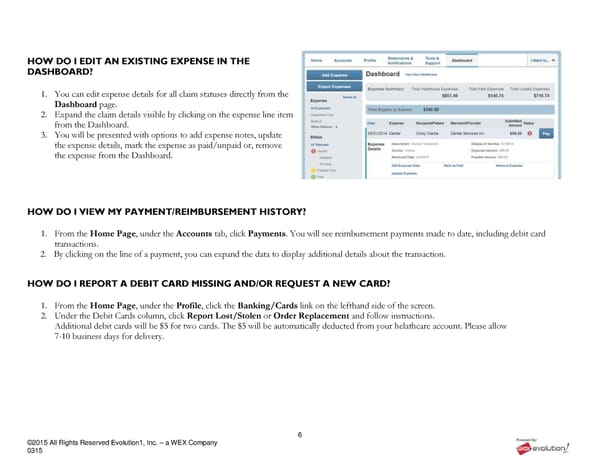
6 ©2015 All Rights Reserved Evolution1, Inc. – a WEX Company 0315 HOW DO I EDIT AN EXISTING EXPENSE IN THE DASHBOARD? 1. You can edit expense details for all claim statuses directly from the Dashboard page. 2. Expand the claim details visible by clicking on the expense line item from the Dashboard. 3. You will be presented with options to add expense notes, update the expense details, mark the expense as paid/unpaid or, remove the expense from the Dashboard. HOW DO I VIEW MY PAYMENT/REIMBURSEMENT HISTORY? 1. From the Home Page, under the Accounts tab, click Payments. You will see reimbursement payments made to date, including debit card transactions. 2. By clicking on the line of a payment, you can expand the data to display additional details about the transaction. HOW DO I REPORT A DEBIT CARD MISSING AND/OR REQUEST A NEW CARD? 1. From the Home Page, under the Profile, click the Banking/Cards link on the lefthand side of the screen. 2. Under the Debit Cards column, click Report Lost/Stolen or Order Replacement and follow instructions. Additional debit cards will be $5 for two cards. The $5 will be automatically deducted from your helathcare account. Please allow 7-10 business days for delivery.
 RSI Member Portal Quickstart Guide Page 5 Page 7