
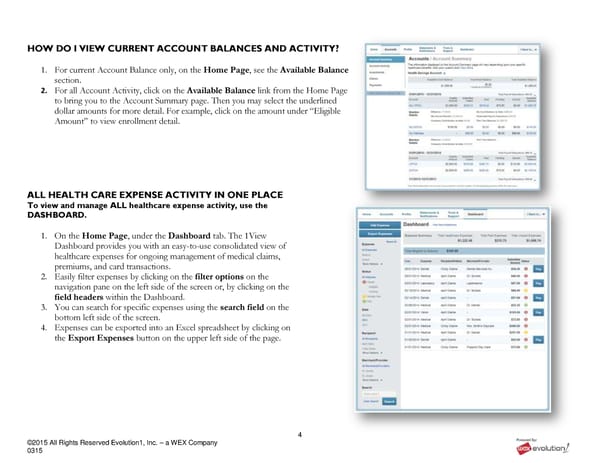
4 ©2015 All Rights Reserved Evolution1, Inc. – a WEX Company 0315 HOW DO I VIEW CURRENT ACCOUNT BALANCES AND ACTIVITY? 1. For current Account Balance only, on the Home Page, see the Available Balance section. 2. For all Account Activity, click on the Available Balance link from the Home Page to bring you to the Account Summary page. Then you may select the underlined dollar amounts for more detail. For example, click on the amount under “Eligible Amount” to view enrollment detail. ALL HEALTH CARE EXPENSE ACTIVITY IN ONE PLACE To view and manage ALL healthcare expense activity, use the DASHBOARD. 1. On the Home Page, under the Dashboard tab. The 1View Dashboard provides you with an easy-to-use consolidated view of healthcare expenses for ongoing management of medical claims, premiums, and card transactions. 2. Easily filter expenses by clicking on the filter options on the navigation pane on the left side of the screen or, by clicking on the field headers within the Dashboard. 3. You can search for specific expenses using the search field on the bottom left side of the screen. 4. Expenses can be exported into an Excel spreadsheet by clicking on the Export Expenses button on the upper left side of the page.
 RSI Member Portal Quickstart Guide Page 3 Page 5